Most system design content online is detached from reality. It talks about chat apps, URL shorteners, or social feeds - systems that fail silently and don’t handle money, hardware, or downtime.
Retail POS systems are different. They operate in hostile environments:
- Unreliable internet
- Hardware failures
- Long operating hours
- Zero tolerance for losing money
This blog walks through how to design a real-world, offline-first retail POS system, similar to what large retailers use - not at a code level, but at a system design level.
1. Problem Statement
We need to design a billing and payment system for a large retail chain with the following characteristics:
- 100+ physical stores
- Each store has multiple cashier counters
- Stores must continue billing even if the internet is down
- Inventory must remain accurate across all stores
- Payments must be safe, auditable, and recoverable
This is not a “cloud-first” system. This is a store-first system.
2. Functional Requirements
- Scan items and generate bills
- Accept cash and card payments
- Print receipts
- Deduct inventory in real time
- Sync store data with central HQ
3. Non-Functional Requirements (Critical)
These matter more than features.
- High availability: Billing must never stop
- Offline-first: Internet outages are normal
- Consistency over time: Eventual consistency is acceptable
- Idempotency: Duplicate events must not corrupt data
- Auditability: Every transaction must be traceable
- Low latency: Cashiers cannot wait
Tradeoff decision:
Temporary inconsistency is acceptable. Losing transactions is not.
4. High-Level Architecture
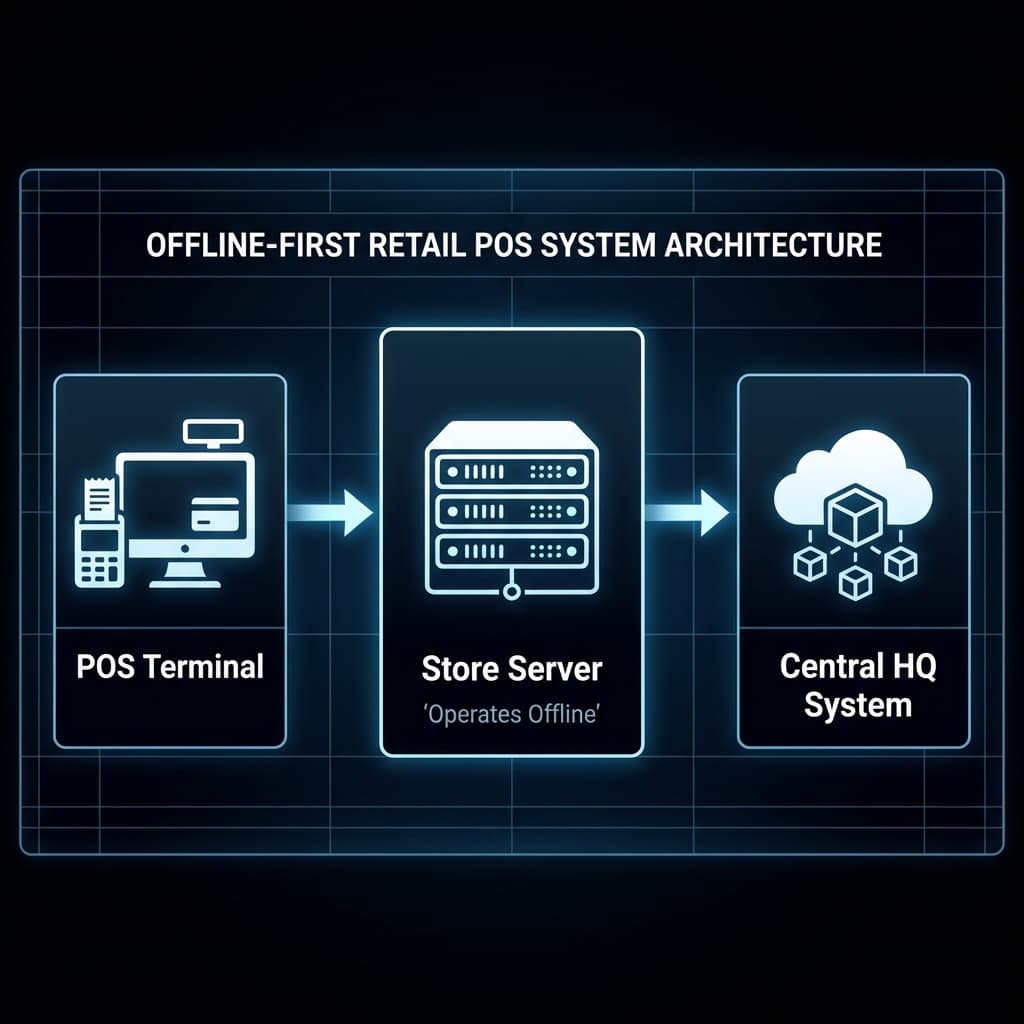
Why this architecture?
- POS terminals are thin clients
- Store server acts as the source of truth during outages
- Central system handles analytics, reconciliation, and reporting
This avoids a single point of failure.
5. Component Breakdown
5.1 POS Terminal (Cashier System)
Responsibilities:
- Scan barcodes
- Build cart
- Trigger payments
- Print receipts
Key constraints:
- Must work with barcode scanners, printers, cash drawers
- Must be keyboard-first and fast
Typical tech (real world):
- C# (.NET WPF) or Java (JavaFX)
In this design, POS terminals do not talk to HQ directly.
5.2 Store Server (Local Backend)
This is the most important component.
Responsibilities:
- Process orders
- Handle inventory deduction
- Store all transactions locally
- Manage payment state
- Sync data to HQ
Key design choice:
The store server is the system of record while offline.
Data store:
- Relational DB (PostgreSQL / Oracle)
- ACID transactions enabled
5.3 Central HQ System
Responsibilities:
- Aggregate data from all stores
- Reconcile payments
- Update prices and offers
- Analytics and reporting
Key property:
- Never blocks store operations
HQ pulls data; stores never depend on HQ availability.
6. Data Modeling (This Separates Seniors from Juniors)
Orders Table
- order_id
- store_id
- terminal_id
- total_amount
- status
- created_at
Payments Table
- payment_id
- order_id
- method (cash/card)
- status (initiated/success/failed)
- reference_id
Inventory Ledger (Not Counters)
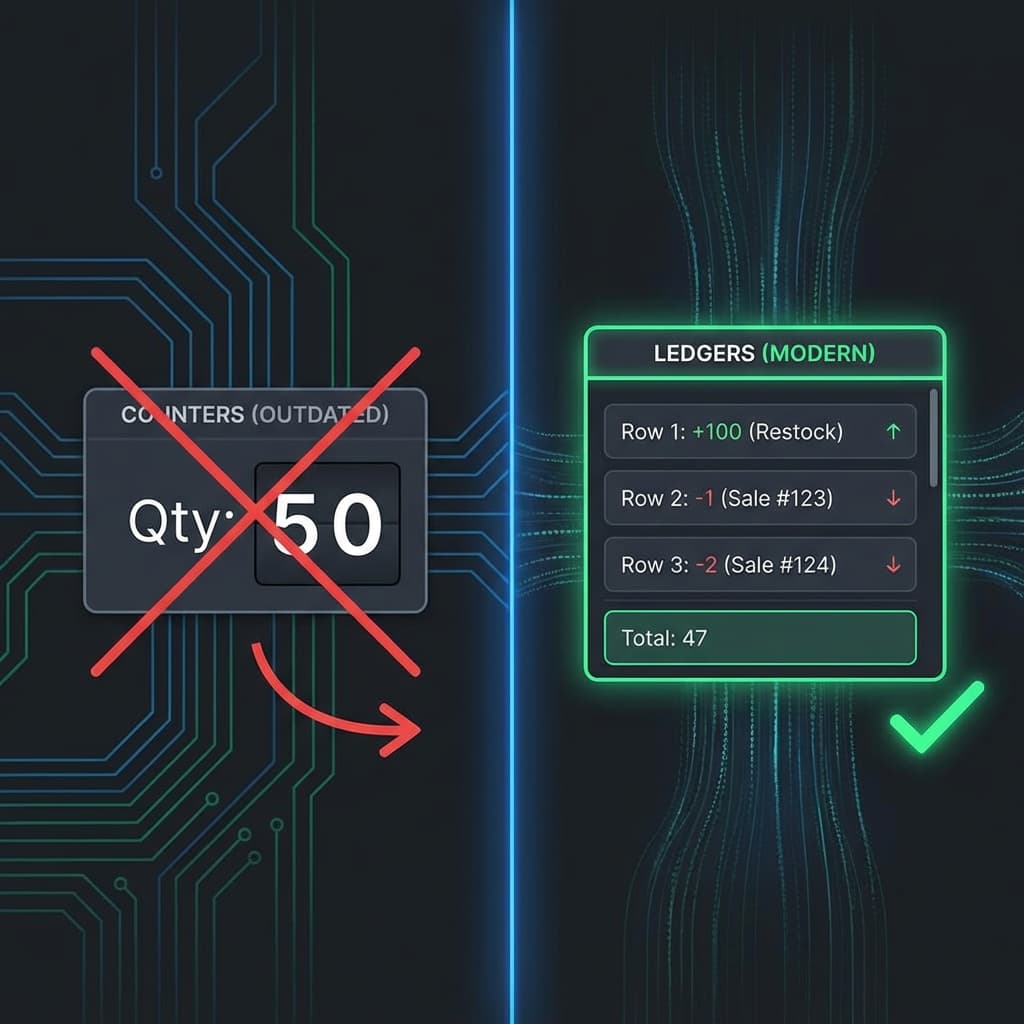
Instead of:
- product_id → quantity
We use a ledger:
- product_id
- change (+/-)
- reason (sale/return/restock)
- reference_id
Why?
- Full audit trail
- Easy reconciliation
- Recovery after crashes
Counters lie. Ledgers don’t.
7. Transaction Flow (Card Payment)
- Cashier scans items
- POS sends order request to Store Server
- Store Server creates order (PENDING)
- POS triggers payment terminal
- Terminal talks to bank/gateway
- Terminal returns SUCCESS/FAILURE
- Store Server updates payment status
- Inventory ledger entry is written
- Receipt printed
Critical rule: Inventory is deducted only after payment success.
8. Failure Scenarios & Handling
Scenario 1: Internet Down
- POS → Store Server works normally
- Transactions stored locally
- Sync queue grows
- No cashier impact
Scenario 2: Duplicate Sync Events
- Every event has a unique ID
- Store server uses idempotent writes
- Duplicate events are ignored
Scenario 3: Payment Success but App Crash
- Payment terminal has reference ID
- On restart, Store Server reconciles
- Order marked SUCCESS after verification
Scenario 4: Power Loss Mid-Bill
- Order remains PENDING
- On restart, cashier can retry or cancel
Failures are expected, not exceptional.
9. Sync Strategy (Store → HQ)
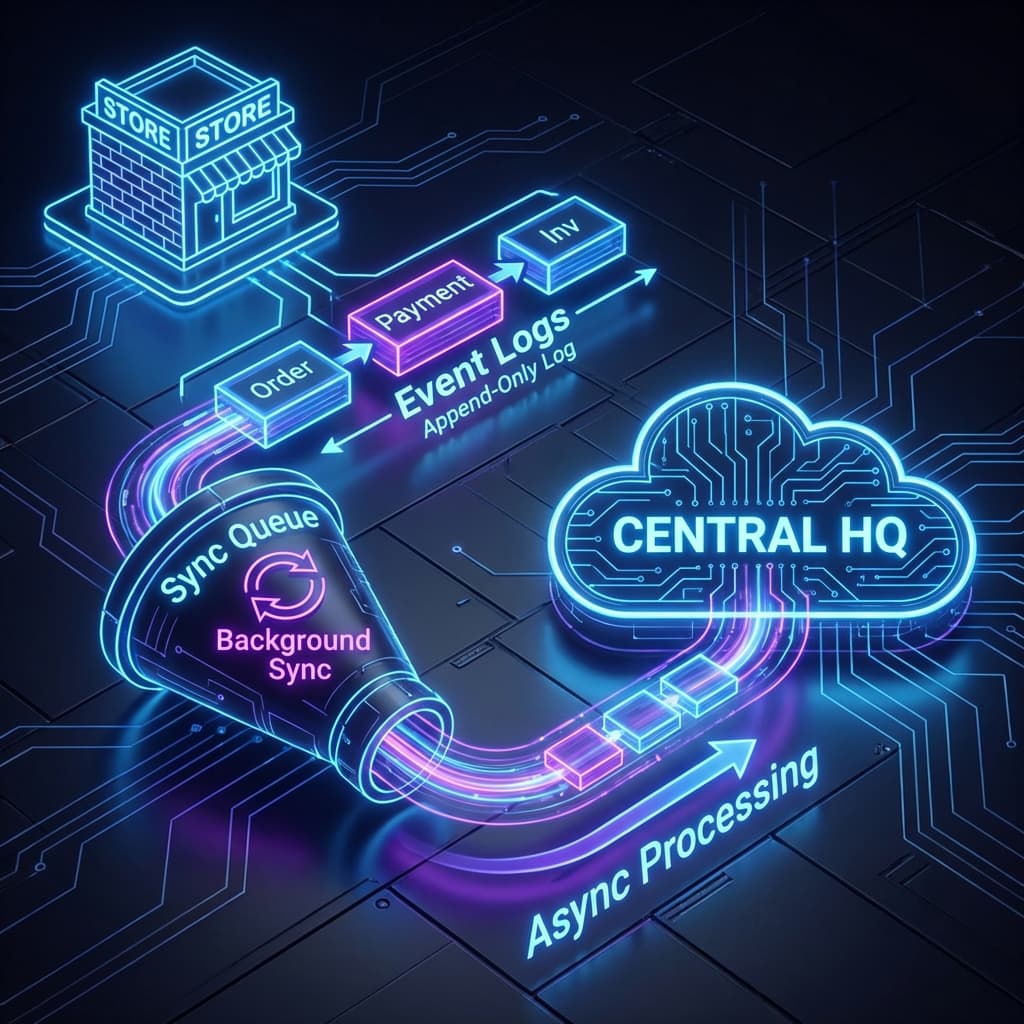
- Store writes events to an append-only log
- Background sync process pushes events
- HQ processes events asynchronously
This ensures:
- No blocking
- No data loss
- Eventual consistency
Messaging systems (Kafka/RabbitMQ) fit naturally here.
10. Security Considerations
- No card data stored on POS
- PCI handled by payment terminals
- Signed sync payloads
- Strict role-based access
Security is layered, not centralized.
11. Tradeoffs & Rejected Approaches
Why not cloud-only?
- Internet is unreliable
- Billing must never stop
Why not microservices?
- Complexity outweighs benefits at store level
- Monolith with clear boundaries is safer
Why eventual consistency?
- Availability matters more than immediate global accuracy
Every tradeoff is intentional.
12. Final Thoughts
Retail POS systems prioritize:
- Correctness over elegance
- Stability over trends
- Recovery over prevention
This design reflects how real money-moving systems are built. Not flashy. Not trendy. But reliable.
If you understand and can explain systems like this, you’re operating above tutorial-level engineering.
Note on Technology Choices
In real production systems, Java or .NET are the dominant choices. Language matters less than design decisions, failure handling, and data integrity.
This blog focuses on system thinking, not syntax.