When I added an MCP (Model Context Protocol) server to inferr, I thought it would be straightforward - expose a few tools, wire up a transport, done. What I didn't anticipate was that making it secure in production would require building a full OAuth 2.1 authorization server from scratch inside my NestJS API.
This post walks through exactly how I did it: the protocol, the architecture decisions, the token security model, and what "connecting Claude to your production app" actually looks like end-to-end.
What Is MCP and Why Does It Need OAuth?
MCP (Model Context Protocol) is an open standard that lets AI agents - like Claude - interact with external systems through structured tools. Instead of copy-pasting data into a chat, you connect your app once and the model calls your tools directly.
The problem is trust. When Claude Desktop or Claude Code connects to https://api.inferr.xyz/mcp, it's making authenticated requests on behalf of a specific user. The server needs to know who that user is before handing over their personalized feed, running a semantic search, or invoking an agentic RAG pipeline.
MCP's transport spec (Streamable HTTP) doesn't handle auth - it delegates that entirely to you. The recommended approach is OAuth 2.1 with PKCE, which is the same flow browser apps use to get tokens from Google or GitHub, but adapted for machine clients like AI agents.
So I had to build:
- A client registration endpoint (
POST /register) - An authorization endpoint (
GET /authorize) that redirects to Google sign-in - A token endpoint (
POST /token) with PKCE verification - A resource server (
POST/GET/DELETE /mcp) that validates JWT bearer tokens
The Architecture: Delegating to Google
Rather than building a full identity system, I delegated authentication to Google - the same Google OAuth flow already powering the inferr web app. The MCP flow just runs a parallel path through it.
Here's the full sequence:
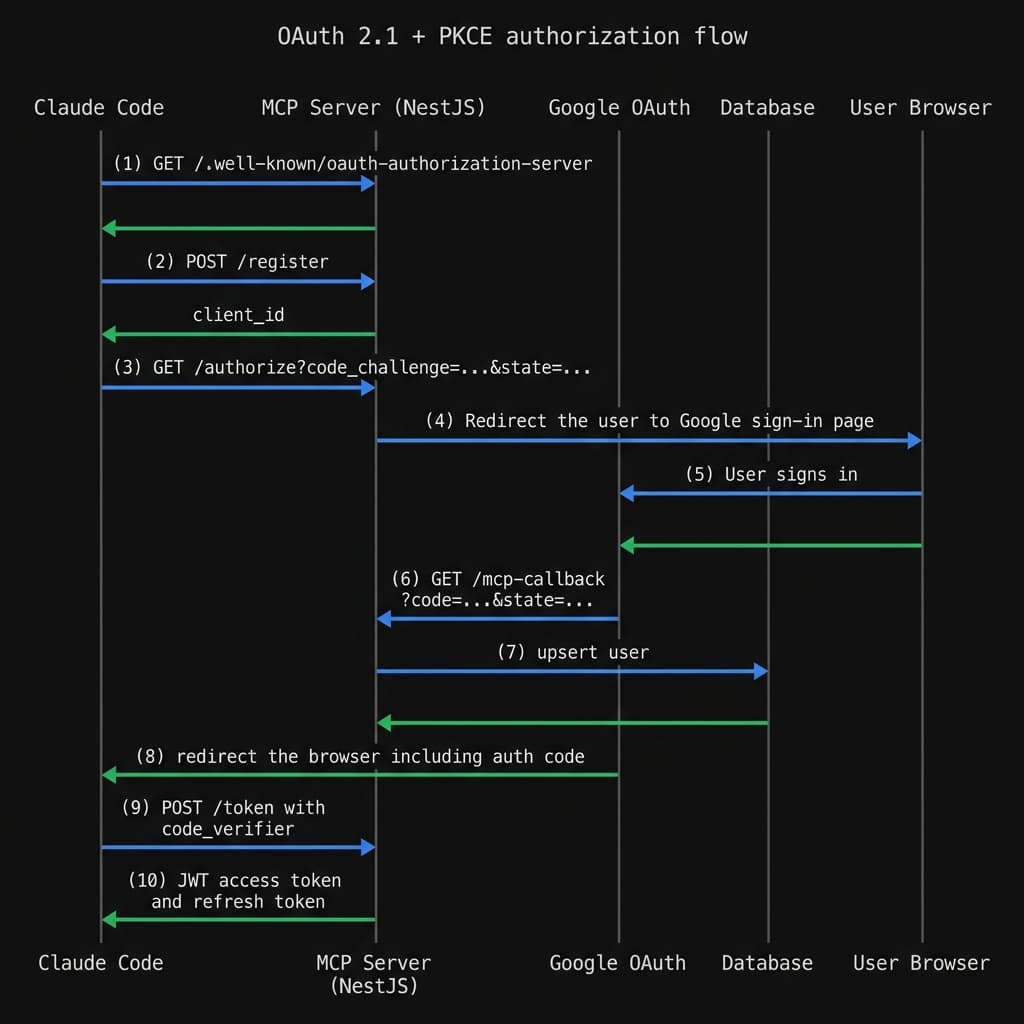
- Claude Code discovers the auth server via
GET /.well-known/oauth-authorization-server - It registers itself at
POST /registerand gets back aclient_id - It opens
GET /authorize?code_challenge=...&state=...(PKCE) - My server redirects to
GET /auth/google/mcp?state=<mcpState> - The user signs in with Google
- Google returns to
GET /auth/google/mcp-callback - My callback upserts the user, issues a single-use auth code, and redirects back to Claude
- Claude exchanges the code at
POST /token- PKCE verified - and gets a 1-hour JWT access token + 7-day refresh token - All subsequent MCP requests carry
Authorization: Bearer <jwt>
The key insight is that mcpState acts as a correlation ID. Before redirecting to Google, I park the pending authorization (client ID, PKCE challenge, redirect URI) in a server-side map keyed by mcpState. When Google returns, I recover it, issue the auth code, and clean up - all within a 5-minute TTL.
authorize(client, params, res) {
  const mcpState = randomUUID();
  this.pendingMcpAuthorizations.set(mcpState, {
    clientId: client.client_id,
    codeChallenge: params.codeChallenge,
    redirectUri: params.redirectUri,
    clientState: params.state,
    expiresAt: Date.now() + PENDING_TTL_MS,
  });

  const googleState = Buffer.from(mcpState).toString('base64url');
  res.redirect(`/auth/google/mcp?state=${encodeURIComponent(googleState)}`);
}
Separate Strategy, Separate Callback
One thing that tripped me up early: you can't reuse the existing GoogleStrategy (which handles the web app login) for the MCP flow. They need different callback URLs, and - critically - they carry different state payloads.
The solution was a second Passport strategy, google-mcp, registered independently:
@Injectable()
export class GoogleMcpStrategy extends PassportStrategy(Strategy, 'google-mcp') {
  constructor() {
    const clientID = process.env.GOOGLE_CLIENT_ID;
    const clientSecret = process.env.GOOGLE_CLIENT_SECRET;
    if (!clientID || !clientSecret) {
      throw new Error('GOOGLE_CLIENT_ID and GOOGLE_CLIENT_SECRET must be set');
    }
    super({
      clientID,
      clientSecret,
      callbackURL: process.env.GOOGLE_MCP_CALLBACK_URL,
      scope: ['email', 'profile'],
    });
  }
}
Both strategies share the same Google OAuth credentials, but each has its own callback URL registered in Google Cloud Console. When the MCP callback fires, it routes to completeMcpAuthorization() which issues the auth code - completely separate from the web app's session handling.
Token Security: Two Systems That Can't Cross
Here's where I spent the most time getting it right.
inferr already had a web-app token system: short-lived JWTs for API access, SHA-256-hashed refresh tokens in a refresh_tokens table. I could not reuse these for MCP - a stolen web token shouldn't grant MCP access, and vice versa.
The solution: a type claim baked into every MCP JWT.
private signAccessToken(userId: string, clientId: string): string {
  return this.jwtService.sign(
    { sub: userId, type: 'mcp_access', scope: 'mcp', clientId },
    { expiresIn: ACCESS_TOKEN_TTL_SECONDS },
  );
}
When verifying an incoming MCP request, I check the type field before accepting the token:
verifyAccessToken(token: string): Promise<AuthInfo> {
  const payload = this.jwtService.verify(token);
  if (payload.type !== 'mcp_access') {
    return Promise.reject(new Error('Not an MCP access token'));
  }
  // ...
}
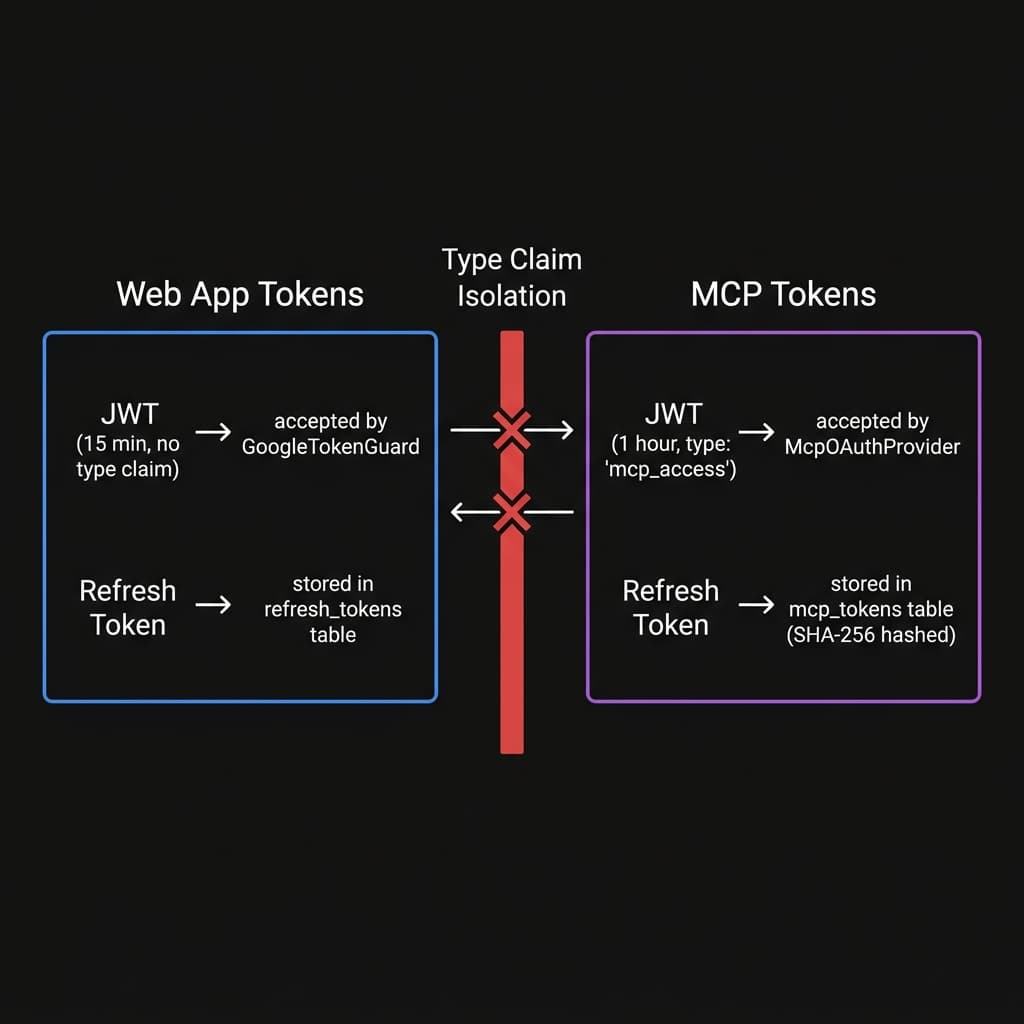
A web-app JWT - even if valid and unexpired - will be rejected by the MCP resource server. And an MCP JWT won't be accepted by the web API's GoogleTokenGuard. The systems are cryptographically isolated.
MCP refresh tokens go into their own mcp_tokens table, stored as SHA-256 hashes. On every use, the old token is revoked and a new one is issued atomically:
await this.db.transaction(async (tx) => {
  await tx.insert(mcpTokens).values({ userId, tokenHash: newHash, expiresAt });
  await tx.update(mcpTokens)
    .set({ revoked: true, replacedByHash: newHash })
    .where(eq(mcpTokens.tokenHash, oldHash));
});
If a token is used after already being rotated - a sign of theft - the entire chain for that user is nuked. Both the attacker and the victim are forced to re-authenticate.
Per-User MCP Server Instances
The last piece is the most important for security: one MCP server instance per authenticated session.
When Claude initiates a connection, my controller creates a transport, authenticates the JWT, extracts the userId, and builds a fresh McpServer with tools that close over that user's identity:
async createTransport(userId: string): Promise<StreamableHTTPServerTransport> {
  const transport = new StreamableHTTPServerTransport({
    sessionIdGenerator: () => randomUUID(),
    onsessioninitialized: (sessionId) => {
      this.transports.set(sessionId, transport);
      this.sessionUsers.set(sessionId, userId);
    },
  });

  const server = this.buildServerForUser(userId);
  await server.connect(transport);
  return transport;
}
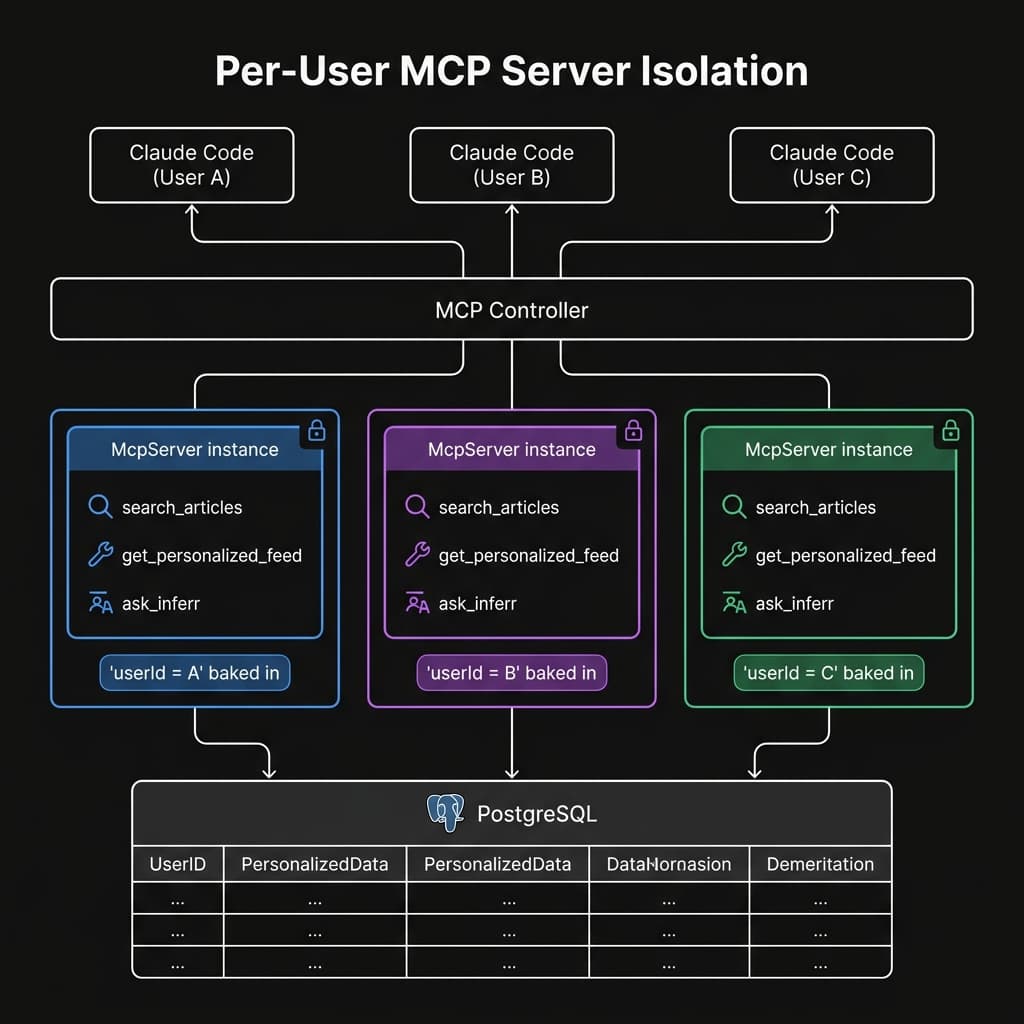
The get_personalized_feed tool never accepts userId as a caller-supplied argument. It's baked in at construction time:
server.tool('get_personalized_feed', {}, async () => {
  const feed = await this.feedService.getPersonalizedFeed(userId); // closed over
  // ...
});
This means one user physically cannot access another user's feed - not through a bug, not through a crafted request. The tool simply doesn't have a parameter for it.
The Result: Claude Inside inferr
After deploying this to production on Render, I pointed Claude Code at https://api.inferr.xyz/mcp. It discovered the auth server, opened a browser, I signed in with Google, and within seconds Claude had access to three live tools:
search_articles- semantic search over the article corpus via pgvectorget_personalized_feed- my ranked feed for today, personalized to my interestsask_inferr- the full LangGraph agentic RAG pipeline (retrieve → grade → rewrite → generate)
Now when I ask Claude "what's worth reading today?", it calls get_personalized_feed against my production database and returns real results - not hallucinations, not cached data, but live articles ranked to my stack.
The gap between "AI assistant" and "AI agent with access to your systems" turns out to be a well-implemented OAuth 2.1 server. It's more work than slapping an API key on a header, but the security model it gives you - PKCE, token isolation, reuse detection, per-user sandboxing - is worth every line.